ObJS
====
## A 3D Wavefront obj file viewer for HTML5 written in JavaScript ###
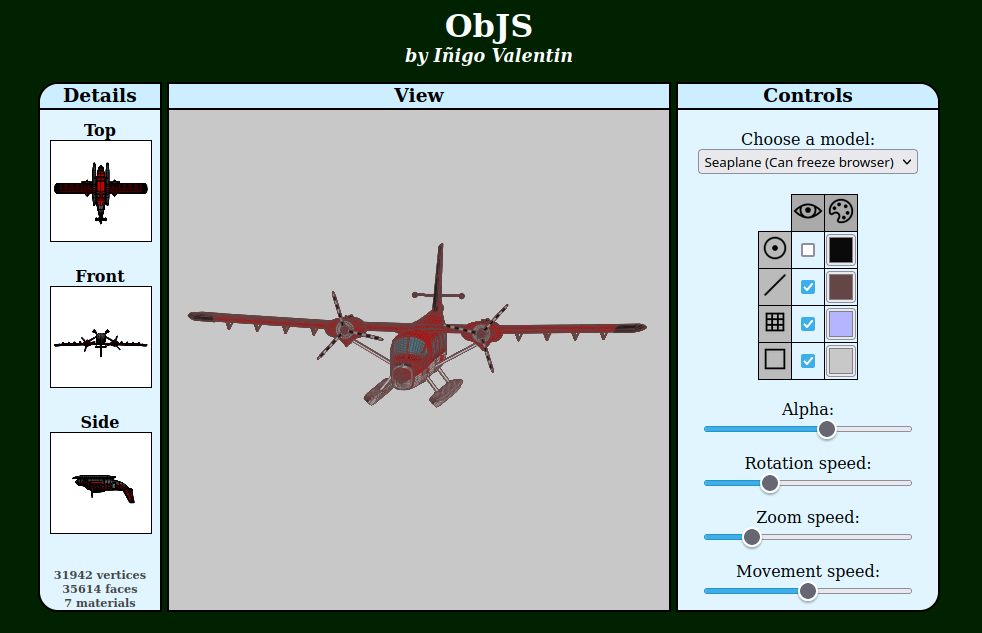 ### Live demo ###
https://objs.inigovalentin.com
### Features ###
* Object rotation.
* Zoom in and out.
* Object movement.
* Mouse and touch control.
* Choose to draw (or not) vertices, edges or faces.
* Use mtl files for material color.
* Change colors of background, vertices, edges, and faces during runtime.
* Change face transparency during runtime, so hidden elements are visible.
* Change zoom and rotation speed during runtime.
### How to use ###
Just include the *ObJS.js* in your project, create a ObJS object, and initalize its canvas.
```javascript
myObJS = new ObJS();
myObJS.initCanvas(canvas);
```
* *canvas* is the canvas element in witch the model will be represented. If this parameter is not specified, the script will try to use a canvas called *ObJSCanvas*.
Then you can load any obj model by calling
```javascript
myObJS.load(file);
```
* *file* is a character string with the path to the file, relative or absolute.
If you want to clear the canvas, just call
```javascript
myObJS.clear();
```
Note that the canvas is automatically cleared when a new object is loaded.
### Transformations ###
##### Rotate the object #####
You can rotate the object by dragging it with the mouse or your finger in a touch screen. Also, you can apply rotation programatically:
```javascript
setRotationSpeed(int speed)
rotateX(int direction)
rotateY(int direction)
```
##### Move the object #####
You can move the object around by dragging it with the mouse while holding down the *shift* key. Also, you can move it programatically:
```javascript
setMovementSpeed(value)
moveHorizontal(int direction)
moveVertical(int direction)
```
##### Zoom #####
Zoom in and out can be achieven with the mouse wheel, by pinching the mode if you are using a touch screen, or programatically:
```javascript
setZoomSpeed(int speed)
zoom(int level)
```
### Customization ###
You can programatically change parameters such as the elements to draw, their color, transparency, rotation speed, zoom speed...
```javascript
drawVertices(boolean draw)
drawEdges(boolean draw)
drawFaces(boolean draw)
drawBackground(boolean draw)
setVerticesColor(string code)
setEdgesColor(string code)
setFacesColor(string code)
setBackgroundColor(string code)
setAlpha(int alpha)
linkMaterial(boolean link)
```
### Full list of methods ###
| Method | Return | Description |
| -------------------------------------- | ----------------------------------------------------- | ----------- |
| ```drawBackground(boolean draw)``` | - | A solid color background is shown in the canvas depending on the value of *draw*. |
| ```drawEdges(boolean draw)``` | - | The edges of the model are represented in the canvas depending on the value of *draw*. |
| ```drawFaces(boolean draw)``` | - | The faces of the model are represented in the canvas depending on the value of *draw*. |
| ```drawVertices(boolean draw)``` | - | The vertizes of the model are represented in the canvas depending on the value of *draw*. |
| ```clear()``` | - | Clears the canvas.
| ```getBackgroundColor()``` | {'red': int, 'green': int, 'blue': int, 'alpha': int} | Returns the set color of the canvas background, even if it's not being drawn.
| ```getEdgeColor()``` | {'red': int, 'green': int, 'blue': int, 'alpha': int} | Returns the set color of the model edges, even if they are not being drawn.
| ```getFaceColor()``` | {'red': int, 'green': int, 'blue': int, 'alpha': int} | Returns the set color of the model face, even if they are not being drawn or a material file is being used.
| ```getVertexColor()``` | {'red': int, 'green': int, 'blue': int, 'alpha': int} | Returns the set color of the model vertizes, even if they are not being drawn.
| ```hasMaterial()``` | boolean | Will return true if a .mtl file exists for the current model. |
| ```initCanvas(Canvas canv)``` | - | Initializes the canvas *canv* where the model will be drawn. Must be called before the model can be presented. |
| ```isBackgroundDrawn()``` | boolean | Will return true if the canvas background is being drawn. |
| ```isEdgeDrawn()``` | boolean | Will return true if the the model edges are being drawn. |
| ```isFaceDrawn()``` | boolean | Will return true if the the model faces are being drawn. |
| ```isVertexDrawn()``` | boolean | Will return true if the the model vertizes are being drawn. |
| ```isMaterialUsed()``` | boolean | Will return true if a material is to be used, even if the material file does not exist. |
| ```linkMaterial(boolean link)``` | - | If set to true, it will use a .mtl file in the same directory as the .obj one as material reference. Will have no efect if such file does not exist. |
| ```load(string filename)``` | - | Loads a obj file. *filename* must be the name of the file, without path or extension. |
| ```moveHorizontal(int direction)``` | - | Moves the model horizontally. A positive value for *direction* will move the model to the right, a negative one will do so to the left. It's recomended to use only values of 1 or -1 to achieve smooth transitions. To control the movements, see the setMovementSpeed(int speed) method.|
| ```moveVertical(int direction)``` | - | Moves the model vertically. A positive value for *direction* will move the model up, a negative one will do so down. It's recomended to use only values of 1 or -1 to achieve smooth transitions. To control the movements, see the setMovementSpeed(int speed) method.|
| ```rotateX(int direction)``` | - | Rotates the model around the X coordinate. A positive value for *direction* will rotate the model clockwise, a negative one will do so counterclockwise. It's recomended to use only values of 1 or -1 to achieve smooth transitions. To control the speed rotation, see the setRotationSpeed(int speed) method.|
| ```rotateY(int direction)``` | - | Rotates the model around the Y coordinate. A positive value for *direction* will rotate the model clockwise, a negative one will do so counterclockwise. It's recomended to use only values of 1 or -1 to achieve smooth transitions. To control the speed rotation, see the setRotationSpeed(int speed) method.|
| ```setAlpha(int alpha)``` | - | Sets the transparency of the faces of the model, 0 being fully transparent and 100 fully opaque. |
| ```setBackgroundColor(string color)``` | - | Sets the color of the background of the canvas. *color* is a hexadecimal triplet with the color code, including the number sign ('#'), and three or six hexadecimal characters, case insensitive. |
| ```setEdgesColor(string color)``` | - | Sets the color of the edges of the model. *color* is a hexadecimal triplet with the color code, including the number sign ('#'), and three or six hexadecimal characters, case insensitive. |
| ```setFacesColor(string color)``` | - | Sets the color of the faces of the model. *color* is a hexadecimal triplet with the color code, including the number sign ('#'), and three or six hexadecimal characters, case insensitive. This method will have no efect if a matarial file is enabled. |
| ```setMovementSpeed(int speed)``` | - | Sets the speed at which the model will move, between 0 and 10. The greater it is, the greater the movement speed. |
| ```setRotationSpeed(int speed)``` | - | Sets the speed at which the model will rotate, between 0 and 10. The greater it is, the greater the rotation speed. |
| ```setVerticesColor(string color)``` | - | Sets the color of the vertizes of the model. *color* is a hexadecimal triplet with the color code, including the number sign ('#'), and three or six hexadecimal characters, case insensitive. |
| ```setZoomSpeed(int speed)``` | - | Sets the speed at which the model will be zommed in or out, between 0 and 10. The greater it is, the greater the zoom speed. |
| ```zoom(int level)``` | - | Zooms in or out of the model. A positive value for *level* will zoom in, a negative one will zoom out. It's recomended to use only values of 1 or -1 to achieve smooth transitions. To control the zoom rotation, see the setZoomSpeed(int speed) method.|
### Live demo ###
https://objs.inigovalentin.com
### Features ###
* Object rotation.
* Zoom in and out.
* Object movement.
* Mouse and touch control.
* Choose to draw (or not) vertices, edges or faces.
* Use mtl files for material color.
* Change colors of background, vertices, edges, and faces during runtime.
* Change face transparency during runtime, so hidden elements are visible.
* Change zoom and rotation speed during runtime.
### How to use ###
Just include the *ObJS.js* in your project, create a ObJS object, and initalize its canvas.
```javascript
myObJS = new ObJS();
myObJS.initCanvas(canvas);
```
* *canvas* is the canvas element in witch the model will be represented. If this parameter is not specified, the script will try to use a canvas called *ObJSCanvas*.
Then you can load any obj model by calling
```javascript
myObJS.load(file);
```
* *file* is a character string with the path to the file, relative or absolute.
If you want to clear the canvas, just call
```javascript
myObJS.clear();
```
Note that the canvas is automatically cleared when a new object is loaded.
### Transformations ###
##### Rotate the object #####
You can rotate the object by dragging it with the mouse or your finger in a touch screen. Also, you can apply rotation programatically:
```javascript
setRotationSpeed(int speed)
rotateX(int direction)
rotateY(int direction)
```
##### Move the object #####
You can move the object around by dragging it with the mouse while holding down the *shift* key. Also, you can move it programatically:
```javascript
setMovementSpeed(value)
moveHorizontal(int direction)
moveVertical(int direction)
```
##### Zoom #####
Zoom in and out can be achieven with the mouse wheel, by pinching the mode if you are using a touch screen, or programatically:
```javascript
setZoomSpeed(int speed)
zoom(int level)
```
### Customization ###
You can programatically change parameters such as the elements to draw, their color, transparency, rotation speed, zoom speed...
```javascript
drawVertices(boolean draw)
drawEdges(boolean draw)
drawFaces(boolean draw)
drawBackground(boolean draw)
setVerticesColor(string code)
setEdgesColor(string code)
setFacesColor(string code)
setBackgroundColor(string code)
setAlpha(int alpha)
linkMaterial(boolean link)
```
### Full list of methods ###
| Method | Return | Description |
| -------------------------------------- | ----------------------------------------------------- | ----------- |
| ```drawBackground(boolean draw)``` | - | A solid color background is shown in the canvas depending on the value of *draw*. |
| ```drawEdges(boolean draw)``` | - | The edges of the model are represented in the canvas depending on the value of *draw*. |
| ```drawFaces(boolean draw)``` | - | The faces of the model are represented in the canvas depending on the value of *draw*. |
| ```drawVertices(boolean draw)``` | - | The vertizes of the model are represented in the canvas depending on the value of *draw*. |
| ```clear()``` | - | Clears the canvas.
| ```getBackgroundColor()``` | {'red': int, 'green': int, 'blue': int, 'alpha': int} | Returns the set color of the canvas background, even if it's not being drawn.
| ```getEdgeColor()``` | {'red': int, 'green': int, 'blue': int, 'alpha': int} | Returns the set color of the model edges, even if they are not being drawn.
| ```getFaceColor()``` | {'red': int, 'green': int, 'blue': int, 'alpha': int} | Returns the set color of the model face, even if they are not being drawn or a material file is being used.
| ```getVertexColor()``` | {'red': int, 'green': int, 'blue': int, 'alpha': int} | Returns the set color of the model vertizes, even if they are not being drawn.
| ```hasMaterial()``` | boolean | Will return true if a .mtl file exists for the current model. |
| ```initCanvas(Canvas canv)``` | - | Initializes the canvas *canv* where the model will be drawn. Must be called before the model can be presented. |
| ```isBackgroundDrawn()``` | boolean | Will return true if the canvas background is being drawn. |
| ```isEdgeDrawn()``` | boolean | Will return true if the the model edges are being drawn. |
| ```isFaceDrawn()``` | boolean | Will return true if the the model faces are being drawn. |
| ```isVertexDrawn()``` | boolean | Will return true if the the model vertizes are being drawn. |
| ```isMaterialUsed()``` | boolean | Will return true if a material is to be used, even if the material file does not exist. |
| ```linkMaterial(boolean link)``` | - | If set to true, it will use a .mtl file in the same directory as the .obj one as material reference. Will have no efect if such file does not exist. |
| ```load(string filename)``` | - | Loads a obj file. *filename* must be the name of the file, without path or extension. |
| ```moveHorizontal(int direction)``` | - | Moves the model horizontally. A positive value for *direction* will move the model to the right, a negative one will do so to the left. It's recomended to use only values of 1 or -1 to achieve smooth transitions. To control the movements, see the setMovementSpeed(int speed) method.|
| ```moveVertical(int direction)``` | - | Moves the model vertically. A positive value for *direction* will move the model up, a negative one will do so down. It's recomended to use only values of 1 or -1 to achieve smooth transitions. To control the movements, see the setMovementSpeed(int speed) method.|
| ```rotateX(int direction)``` | - | Rotates the model around the X coordinate. A positive value for *direction* will rotate the model clockwise, a negative one will do so counterclockwise. It's recomended to use only values of 1 or -1 to achieve smooth transitions. To control the speed rotation, see the setRotationSpeed(int speed) method.|
| ```rotateY(int direction)``` | - | Rotates the model around the Y coordinate. A positive value for *direction* will rotate the model clockwise, a negative one will do so counterclockwise. It's recomended to use only values of 1 or -1 to achieve smooth transitions. To control the speed rotation, see the setRotationSpeed(int speed) method.|
| ```setAlpha(int alpha)``` | - | Sets the transparency of the faces of the model, 0 being fully transparent and 100 fully opaque. |
| ```setBackgroundColor(string color)``` | - | Sets the color of the background of the canvas. *color* is a hexadecimal triplet with the color code, including the number sign ('#'), and three or six hexadecimal characters, case insensitive. |
| ```setEdgesColor(string color)``` | - | Sets the color of the edges of the model. *color* is a hexadecimal triplet with the color code, including the number sign ('#'), and three or six hexadecimal characters, case insensitive. |
| ```setFacesColor(string color)``` | - | Sets the color of the faces of the model. *color* is a hexadecimal triplet with the color code, including the number sign ('#'), and three or six hexadecimal characters, case insensitive. This method will have no efect if a matarial file is enabled. |
| ```setMovementSpeed(int speed)``` | - | Sets the speed at which the model will move, between 0 and 10. The greater it is, the greater the movement speed. |
| ```setRotationSpeed(int speed)``` | - | Sets the speed at which the model will rotate, between 0 and 10. The greater it is, the greater the rotation speed. |
| ```setVerticesColor(string color)``` | - | Sets the color of the vertizes of the model. *color* is a hexadecimal triplet with the color code, including the number sign ('#'), and three or six hexadecimal characters, case insensitive. |
| ```setZoomSpeed(int speed)``` | - | Sets the speed at which the model will be zommed in or out, between 0 and 10. The greater it is, the greater the zoom speed. |
| ```zoom(int level)``` | - | Zooms in or out of the model. A positive value for *level* will zoom in, a negative one will zoom out. It's recomended to use only values of 1 or -1 to achieve smooth transitions. To control the zoom rotation, see the setZoomSpeed(int speed) method.|